Guide: How to Download X (Twitter) Videos with XSaver
X (Twitter) is a popular platform where users share interesting content like photos, videos, GIFs, and audio. If you find something great on Twitter and want to save it to your device, follow these simple steps using XSaver:
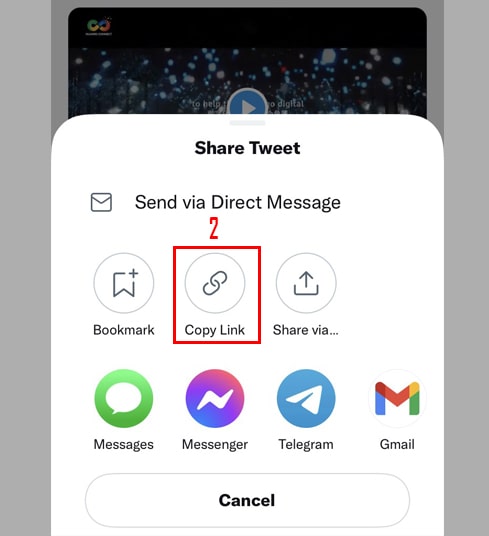
- Step 1: Start by opening the X app and locating the video you wish to keep. Click on the Share icon found at the bottom-right of the post, then tap Copy Link to secure the URL.

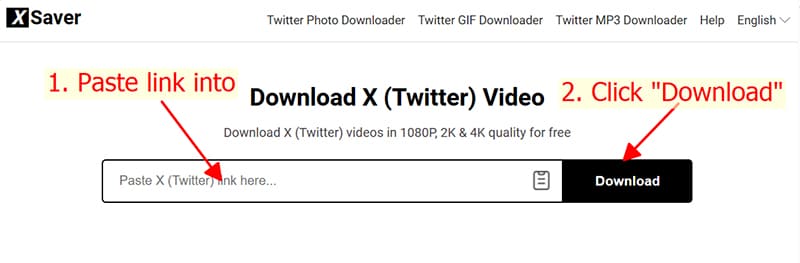
- Step 2: Go to XSaver.app in your browser. Use the Paste feature to insert your link into the search box, then click the Download icon to proceed.
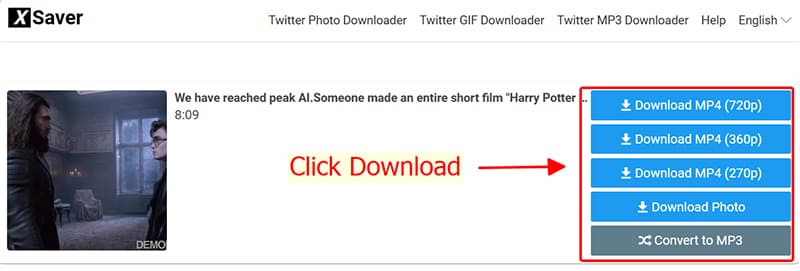
- Step 3: To finish, pick your preferred resolution from the list and hit Download MP4. Your video will be saved to your local storage instantly.
Success! With these three simple steps, XSaver empowers you to archive any X (Twitter) content, from videos to GIFs and MP3s. If our tool made your day easier, feel free to recommend XSaver.app to your circle. We appreciate your support!
Note:
If a download fails, it may be due to the post being private, deleted, or restricted in certain regions. Additionally, locked accounts or age-restricted content on X (Twitter) can prevent XSaver from accessing the media.
Should you experience any technical issues while using XSaver, please reach out to our support team for immediate assistance.